Showing posts with label Internet. Show all posts

How to Start / Setup Your Own Blog Using WordPress


This series of tutorials deals with how you can start your own blog using a blogging software called WordPress. WordPress is a free blogging software that you can install onto your website so that you can write and manage your own blog. It is generally regarded as easy to install and use. The tutorials take you through the steps of installing your own WordPress blog, configuring/customizing it, modifying it so that it is search-engine friendly and so on.

This chapter deals with how you can go about setting up the blog.

Requirements

There are certain prerequisites before you can use WordPress as your blogging software.
  1. Your web host must support the execution of PHP scripts. PHP is basically an interpreted programming language. It is the language in which WordPress is written, and thus for WordPress to run at all, your web host must support it. Most, if not all, commercial web hosts support PHP. If your site is hosted on your ISP, chances are that it does not support PHP and cannot run WordPress.
  2. Your web host must allow you at least 1 MySQL database. WordPress stores its data, your blog entries, in a special file called a database, which allows easy and fast retrieval. Check with your web host if your hosting package provides any MySQL databases. Again, if you are hosted on an account which your ISP supplies to you for free as a result of your using their broadband or dialup services, it is unlikely that you have access to MySQL at all. Get an account with acommercial host instead.
  3. Your web host should not insert any advertisements into your web page. Although this is not an official requirement for running WordPress blogs, my experience is that you will run into problems using your WordPress blog when the web host embeds advertisements into pages displayed on your site. My tests on a few free web hosts providing PHP and MySQL access show that the inserted advertisements interfere with the forms created by the WordPress script, with the result that you may be unable to post or edit any blog entries.
    Note that I am not saying that you cannot insert advertisements onto your own page. Ads you insert on your own page, if done correctly, do not cause problems. However, most free web hosts automatically insert advertisements into your web page without your intervention. Sometimes these advertisements are loaded into portions of the page that interfere with the WordPress script that handles posting and editing.
    (Before you get angry at the free web hosts, you should note that they use the advertisements to recover the cost of running your website. Free web hosts without any viable revenue model tend to close after a short time, as my article on free web hosts that disappear overnight mentions.)

Optional but Recommended

  • Ideally, find a web host that runs the Apache web server on a Unix-type machine (like Linux, FreeBSD, OpenBSD, etc). Although WordPress runs on other web servers, you have many more options on how you can configure the structure of your site and the links (or "permalinks") to your pages if your site runs on Apache.
  • My personal recommendation is that you also get your own domain name. WordPress itself does not require this, but, as with any website, it's best to own your own domain. I found this out the hard way when I started my own sites. If you use a domain name supplied by your web host (such as some-name-or-other.blogspot.com), you are at the mercy of your web host in the long run. When they close, and free web hosts close with alarming frequency, the community and search engine reputation that you have built up over the years will be lost. You will be forced to start your blog on a new host with a new URL, losing people who have bookmarked your site and linked to it. Your previous good search engine ranking will also be lost and you will need to start from scratch. Even if they do not close, they can at any time decide to charge you an exorbitant rate, above market rate, for you to keep your site. You will then have no choice but to agree, since you would otherwise lose everything you have built up over the years.
    With your own own domain name, any time you are dissatisfied with your web host, you can simply backup your database, move to a new host, import your old entries into the new host's database and you're back in business as though nothing has happened. Your visitors may not even realise that you have changed web hosts.

How to Install WordPress

  1. Find out from your web host the name of your MySQL database, the user name you should use to connect to the MySQL database and the password for the database. In some cases, your web host may require you to create the database yourself from their control panel. Follow their instructions and do so. Make sure that you write down all the information provided about your database, word for word, letter for letter. That is, if your web host (or your web control panel) tells you that your database username is called "yourdomain_yourusername", make sure you write that down and not just "yourusername" even if you specified "yourusername" when you created the database. Note also that the user name and password used to connect to your database may not be the same as that used for your web hosting account.
    You will need to use this information later.
  2. Download the latest WordPress software. You can either get the zip version or the "tar.gz" version. If you don't know what "tar.gz" is, download the zip version. This tutorial assumes that you have downloaded the zip version.
  3. Unpack (or unzip) all the files contained in the archive you downloaded. If you use Windows XP, simply double-click the file, and drag the folder "wordpress" onto your desktop.
  4. Open the "wordpress" folder. In Windows, this means double-clicking the folder. In the window that opens, you should be able to spot a file named "wp-config-sample.php". If you cannot find such a file, and you are using Windows, look for a file named "wp-config-sample" (without the PHP extension). Windows hides file extensions by default.
    Start up an ASCII text editor and open that "wp-config-sample.php" file in it. In Windows, you can simply use Notepad. To start Notepad, go to the Accessories folder in your Start menu and click the "Notepad" item. Then click the "File" menu, followed by the "Open" item in the menu that appears. Navigate to the file you found earlier and double-click it to open it.
  5. In the file, you will see lines like the following:
    /** The name of the database for WordPress */
    define('DB_NAME', 'database_name_here');
    
    /** MySQL database username */
    define('DB_USER', 'username_here');
    
    /** MySQL database password */
    define('DB_PASSWORD', 'password_here');
    
    /** MySQL hostname */
    define('DB_HOST', 'localhost');
    
    /** Database Charset to use in creating database tables. */
    define('DB_CHARSET', 'utf8');
    
    Replace "database_name_here" with the name of your database. Make sure that the name of your database is enclosed within the single quotes. That is, if the name of your database is "mywordpressdatabase", the line should read:
    define('DB_NAME', 'mywordpressdatabase');
    
    Replace "username_here" with your MySQL database username, and the "password_here" with your MySQL password. Again, make sure you do not delete the enclosing single quotes.
    Scroll down the file to find the section containing words like the following:
    define('AUTH_KEY',         'put your unique phrase here');
    define('SECURE_AUTH_KEY',  'put your unique phrase here');
    define('LOGGED_IN_KEY',    'put your unique phrase here');
    define('NONCE_KEY',        'put your unique phrase here');
    define('AUTH_SALT',        'put your unique phrase here');
    define('SECURE_AUTH_SALT', 'put your unique phrase here');
    define('LOGGED_IN_SALT',   'put your unique phrase here');
    define('NONCE_SALT',       'put your unique phrase here');
    
    Replace all instances of "put your unique phrase here" with any phrase you like. They can also be of any length. Like your password, these keys are supposed to improve the security of your blog. If you can't be bothered to think up new phrases for those keys, you can use WordPress' secret key generatorto generate some random sequence of characters that you can copy and paste into those lines.
    Save the file under a new name, "wp-config.php". To do this in Notepad, click the "File" menu followed by the "Save as" item on the menu that appears. Type the name "wp-config.php", including the quotes. You must include the quotes or Notepad will name the file "wp-config.php.txt" behind your back.
  6. Now comes the long and tedious part: uploading the files to your web hosting account. Basically, what you will need to do here is to transfer all the files in the wordpress folder to your web host. It is a long process (especially if your upload speed is slow) since there are many files to transfer.
    You will need an FTP program. An FTP program is simply a piece of software that transfers files from your computer to your web host. (It can transfer files the other way as well, but that is beside the point of this tutorial.) You can either get one of the free FTP programs listed on thefreecountry.com's Free FTP Clients, Secure FTP (SFTP) Programs page, or use some other FTP client that you like.
    If you don't have any preference, try FileZilla so that you can use my tutorial How to Upload a File to Your Website Using the FileZilla FTP Client on http://www.thesitewizard.com/gettingstarted/howtoupload.shtml as a guide on how you can upload your WordPress files. If you use some other software, you will need to read the instructions supplied with that software yourself.
    Whichever software you use, connect to your web host using that software, and transfer ALL the files located in your wordpress directory. You can do either of 2 things:
    • Transfer the files directly into the main web directory of your web hosting account. You may want to do this if your entire website consists of your blog. You should also do this if you are a total novice when it comes to creating a website or blog, since it will simplify your job later.
    • Transfer the files into a subdirectory (sub-folder) of your web hosting account. This is useful if your blog is only a small part of your website. You will then need to create a main page for your website that has a link pointing to your blog. For example, if you create a folder called "blog" in your main web directory, the URL to your blog will be called www.example.com/blog/, and you will need to create a file www.example.com/index.html that points to that URL. If you take this route, whenever I say www.example.com/wp-admin/install.php and www.example.com/wp-login.php later, you will need to use www.example.com/blog/wp-admin/install.php and www.example.com/blog/wp-login.php instead. You will also need to create the index.html yourself. If you don't understand what I just said in this paragraph, use the first option.
  7. Once you have finished uploading your files, open your browser and go to www.example.com/wp-admin/install.php. Replace the "www.example.com" with the real URL of your website. You will now need to complete the installation of your blog using WordPress' browser interface.
    If you get an error message at this point, telling you that WordPress could not connect to your database, it probably means that you entered the database name, user name or password wrongly in your wp-config.php file. Fix the incorrect information in the wp-config.php file, and upload that file again to your website. Then try www.example.com/wp-admin/install.php.
  8. Fill in the name of your blog and your email address. Click "Continue to the second step".
  9. WordPress then sets up your blog and displays a page giving you your blog username and a password. Write this username and password down somewhere. You will need to use this every time you manage your blog or post an entry.
Congratulations, you have successfully installed WordPress. You can start posting to your blog by going to www.example.com/wp-login.php (replace www.example.com with your domain name), logging in with the "admin" user name and the password supplied to you earlier and following the instructions given on that page.

Download free Internet Explorer 10 Release Preview For Windows 7

Microsoft has released the Internet Explorer 10 Release Preview (Pre-release aka Beta) for Windows 7. It seems that no major UI change has been done. But some good changes are done. Microsoft claims that it is two times faster as fast as Google Chrome 23 and 20-25 percent faster than Firefox 16.


System Requirements:

  • 32-bit or 64-bit edition of Windows 7 SP1 or 64-bit edition of Windows Server 2008 R2 SP1
  • Minumum 512 MB of RAM
  • Minimum 70 / 120 / 200 MB of hard drive space
  • At least 1 GHz processor
Internet Explorer 10 Release Preview comes with built-in spell checker, new scroll bars, option to open last browsing session, new web standards changes and some other changes. It's come with 'Do not track' feature enabled by default. It is faster in comparison to IE 9.
 In many tests of speed and HTML5, it fails to come in Top 5.

How to watch 18+ adult videos on Youtube without sign in


watch_youtube_adult_videos_without_sign_in_1You might have come across a warning while watching videos on Youtube asking you to sign- in to watch 18+ adult videos which contain either explicit language or violence.
[UPDATE – 21 Jan, 2012]: Refer to Method 3
Here is how to view such videos without sign-in. Read on.
watch_youtube_adult_videos_without_sign_in
STEPS:
Just keep track of the last 11 letters in any youtube video URL.
METHOD 1: (DOES NOT WORK SOMETIMES)
  1. Copy the video URL (present in the address bar of the browser)
  2. Now just replace the word watch with watch_popup and now the URL ishttp://www.youtube.com/watch_popup?v=O07u7KdRVo0
  3. That’s it. You are done.
The above method is what you find all over the net. But this method might not work always. In such cases, use the below method.
METHOD 2: (WORKING)
  1. Copy the video URL (present in the address bar of the browser)
  2. Here O07u7KdRVo0 is the video_id.
  3. Now, use this video_id as the following URL http://www.youtube.com/v/video_id?fs=1
  4. Now replace the video_id with the O07u7KdRVo0 to get
METHOD 3: (To be used for URLs with slightly different format - WORKING)
  1. This method is for some URLs which have different format like below:
    http://www.youtube.com/verify_age?next_url=/watch%3Fv%3DJaFVr_cJJIY

    life_in_a_day_movie_youtube_without_sign_in
  2. Such URL is same as the following URL except that the symbols are coded
    http://www.youtube.com/verify_age?next_url=/watch?v=JaFVr_cJJIY
    Just keep track of the last 11 letters –as said before.
  3. So, finally to view such videos it is same as the method 2 – change the above URL to the following
    http://www.youtube.com/v/JaFVr_cJJIY?fs=1
That is all ! Hope the article has addressed the issue. Do comment back in case of any problem and do share with us if you know other ways to access such videos.
Do remember that it is better not to sign in and watch videos as Google keeps track of your history even though the web history is disabled. Because there are sources which confirm that sites like Google use previous search history to predict the behavior and there by customize the search results, targeted advertisements etc.

10 creative Facebook Timeline cover photos


Here are even more creative designs used as cover photos found on various timelines on Facebook. The main intention of this article is to help you get more ideas about designing the cover photo for your Facebook Timeline.
creative_facebook_timeline_cover_photos_1_mini
creative_facebook_timeline_cover_photos_2_mini
creative_facebook_timeline_cover_photos_3_mini
creative_facebook_timeline_cover_photos_6_mini
creative_facebook_timeline_cover_photos_7_mini
creative_facebook_timeline_cover_photos_9_mini
creative_facebook_timeline_cover_photos_10_mini
creative_facebook_timeline_cover_photos_8
Hope the above covers have helped you get some more ideas about how to design your photo. Time for some creative work now….
And yes... we will keep you updated about more interesting Timeline designs and cover photos soon.

7 Most Popular Social Networking Sites


1. Facebook 


According to Wikipedia 
Facebook is a social networking service and website launched in February 2004 that is operated and owned by Facebook, Inc.. 

Users can create a personal profile, add other users as friends and exchange messages, including automatic notifications when they update their profile.Additionally, users can join a user group that has a specific purpose, sorted by workplace, school, college, or other characteristics.

2. Twitter 


According to Wikipedia 
Twitter is a website owned and operated by Twitter Inc.., Which offers a social networking micro-blogging that allows users to send and read messages called Chirp (tweets). Tweets are text posts of up to 140 characters displayed on the user profile page. Tweets can be seen outside, but senders can restrict message delivery to their friends list only. Users can see other writers chirp known as followers (Follower).

3. LinkedIn 


According to Wikipedia 
LinkedIn is a social networking website oriented businesses, mainly used for professional networking. As of September 2007 this site has over 14 million registered users, covering 150 industries and more than 400 economic areas are classified according to merit. 

LinkedIn CEO Dan Nye is currently and offices are located in Mountain View, California. The company is funded by Greylock, Sequoia Capital, Bessemer Venture Partners and European Founders Fund. LinkedIn began to reap the benefits (positive cash flow) since March 2006.

4. MySpace 


According to Wikipedia 
MySpace is a social networking site. Its headquarters is located in Beverly Hills, California, and in one office building with its immediate owner, the News Digital Media, News Corporation belongs.

5. Friendster 


According to Wikipedia 
Friendster, an idea derived its name from the name of Napster, is a social networking website which provides the facility to create a profile and then fill in the data itself to then get an account on Friendster. In Friendster, we are also able to see our friends and friends of friends of friends of our friends, in addition to seeing our own friends.

6. Multiply 


According to Wikipedia 
Multiply.com is a social networking site with features that enable people to mutually share some media, such as photos, videos, and blogs. 

Multiply.com provide blog service. The blog post to Multiply.com can be automatically forwarded to an account LiveJournal, Blogger or Typepad

7. Orkut 


According to Wikipedia 
Orkut is a social networking service, allowing users to view personal and professional information, meet new friends and maintain friendships established. Here, users can also join a community that has a common interest. 

However the service was taken from its creator, Google employee Orkut Büyükkökten named. When it first appeared, Orkut will only be obtained through invitation, and opened to the public since October 2006.

EVENTS IN THE WORLD IT


1. Skipping Yahoo Facebook
Did you know that Mark Zuckerberg had almost sold the rights to ownership of Facebook to Yahoo? In 2006, Yahoo saw the potential of Facebook is big enough to be used as opposed to MySpace. They had offered money amounting to U.S. $ 1 billion to Mark. But when the acquisition occurs almost suddenly Yahoo shares fell to 22 percent. Reaction Yahoo? Negotiating lower prices bid for Mark to U.S. $ 800 million. Obviously he refused and finally decided to raise Facebook alone.

2. Real Networks Reject "iPod"
iPod, the most popular multimedia file player this time, the concept was rejected by Philips and Real Networks. Precisely in 2000, Tony Fadell offering tiny MP3 player concept, style, and provides content-delivery system that allows charging of music, called Pod.

Only Apple would accept the proposal Fadell and manufactures devices that we know as the iPod and the content-delivery system called iTunes. Currently 80% of iTunes dominates the digital music market in the world pay. News Real Networks? With its RealPlayer, their income per year than the income of only a handful of Apple's iTunes only, not iPod sales plus.
http://static.howstuffworks.com/gif/ipod-touch-5.jpg

3. IBM mengatrol Microsoft
In 1980, IBM's first PC was working on the project and look for a software company that can provide a disc operating system (DOS). Initially they asked for help Gary Kildall of Digital Research, maker of the operating system CP / M.
But the negotiations did not go smoothly and eventually switched to IBM duo Bill Gates and Paul Allen were with Microsoft DOS. IBM contract was established and hugely successful, as well as bring up the Microsoft. If you only want to accept the offer Kildall IBM, perhaps the company who would like Microsoft meraksasa today.

4. Xerox Alto "Stolen" Apple
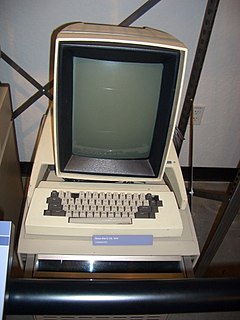
Vendor Xerox developed the first computer to use a window-based GUI. Computers that have previously only rely on text as operational. Named Alto, is equipped with computer mouse, ethernet networking, and WSYIWYG text editor (what you see is what you get).However, when it launched in 1973, the consumer PC market has not yet formed.
Consequently Xerox Alto only distribute to a few universities for free. Well, in 1979, Steve Jobs visited Xerox PARC, the Alto workmanship. When viewing a computer, it immediately inspired and then implement many key features of Alto to the Lisa and Mac, the two PCs are company developed. Apparently Mac really selling well, while Xerox who eventually followed by marketing the Xerox Star (Alto-based technology) it's too late to enter the market.

5. "Google" Before Google
Mid-1990s when the search is still balanced antarmesin war between Yahoo, Altavista, and Lycos, there is one sticking to the surface. Open Text Web Index name. Similar Google today, Open Text known for its speed of response, accuracy, and comprehensive. In 1995, the architecture of Open Text purchased even for application in Yahoo search engine.

But two years later, the owner of Open Text decided to switch sides to the sector for enterprise content management system. And in 1998, Google launched. If only Open Text (and Yahoo) to keep playing in search engine technology, maybe this time they are leading the market. Unfortunately, they did not realize the magnitude of the search engine in the industry today.

6. Microsoft Saved Apple
Year 1997 is the year of the rise of Apple. In a financial crisis due to its Mac compete with Power Computing and Radius, they threatened to stop production. Fortunately, help came unexpectedly: Microsoft. Unexpectedly they are willing to buy Apple stock for U.S. $ 150 million, relatively sufficient to extend the breath.
Steve Jobs, as a negotiator in the talks with Microsoft, finally appointed as CEO of Apple. Then through the cold hand, Apple is now even able to compete with Microsoft - the interpreter helper - in the IT business competition.

50 Important People Virtual Worlds

Anyone who gives the greatest influence on the online network? Based on the analysis of PC World, there's power brokers, bloggers, intellectuals, and businessmen to find the contribution of who determines how people use the Web service in the world.
  * Eric Schmidt, Larry Page, and Sergey Brin, Google Executive
* Mark Elliot Zuckerberg, Facebook Founder
* Steve Jobs, CEO of Apple
* Bram Cohen, BitTorrent cofounder
* Mike Morhaime, president of Blizzard Entertainment
* Jimmy Wales, Founder of Wikipedia
* John Doerr, venture capitalist at Kleiner, Perkins, Caulfield & Byers
* Craig Newmark, Founder of Craigslist
* Peter Levinsohn, president of Fox Interactive Media
* Marissa Mayer, Google's vice president for search products and user experience
* Chad Hurley and Steve Chen, Founder of YouTube
* Kevin J. Martin, chairman of the U.S. Federal Communications Commission
* Brad Templeton, chairman of the board of the Electronic Frontier Foundation
* Henry Chon, CEO of Cyworld
* Shana Fisher, senior vice president of IAC / InterActiveCorp for strategy and M & A, Chairman and CEO of IAC / InterActiveCorp
* Niklas Zennstrom and Janus Friis, Skype and KaZaA Founder
* Matt Mullenweg Developer and web blogging software WordPress
* Philip Rosedale, CEO of Linden Lab
* Jon Lech Johansen, Creator DeCSS decryption program
* Jerry Yang, David Filo, and Terry Semel, Yahoo's executive circles
* Jack Ma, Alibaba.com COO
* Brewster Kahle, director of the Internet Archive
* Ray Ozzie, chief software architect of Microsoft
* Markos Moulitsas Zuniga, Daily Kos Blogger
* Jeff Bezos, CEO of Amazon
* Robert Scoble, vice president of media development for PodTech.net
* John Battelle, entrepreneur and chairman of Federated Media Publishing
* Lawrence Lessig, CEO of Creative Commons
* Meg Whitman, CEO of eBay
* Ron Wyden, Oregon Sen.
* Michael Arrington, Blogger / publisher of origin TechCrunch
* Bruce Schneier, Cryptographer
* Kevin Rose, Founder of Digg
* David Farber, Founder Interesting-People.org
* John Hinderaker, Scott Johnson, and Paul Mirengoff, Author PowerLine
* Vinton G. Cerf, Chairman of ICANN's Board of Directors, as well as vice president and chief Internet evangelist for Google
* Tim O'Reilly, Founder and CEO of O'Reilly Media
* Drew Curtis, Founder of Fark.com
* Gabe Rivera, Techmeme Creator
* Dave Winer, blogger and author RSS 2.0
* Mike Schroepfer, Mozilla's vice president of engineering
* Perez Hilton, the Hollywood blogger
* Paul Graham, Trevor Blackwell, Robert Morris, and Jessica Livingston, Founder of Y Combinator
* Mikko H. Hypponen, director of antivirus research at F-Secure
* Rob Malda, founder Slashdot.org
* Nick Denton, Gawker Media Founder
* Sir Tim Berners-Lee, Director of the World Wide Web Consortium (W3C)
* Leo Laporte, Creator podcast This Week in Tech (TWiT)
* Mohammed and Omar Fadhil, Iraq Voice Blogging
* Jesse James Garrett, Adaptive Path president
* Tila Tequila, People MySpace


History Origins Establishment Google

Google is a U.S. company's most well-known through its search engine which is also called Google. 


Company 
Google Inc. (NASDAQ: GOOG) was established on 7 September 1998 at their friend's garage space in Menlo Park, California. In February 1999, the company moved into offices at 165 University Ave., Palo Alto, California before moving to the "Googleplex" at the end of the year. 


The search engine 
Google is the search engine on the Internet are based in the United States. Google is one of the most popular search engines on the web and receive at least 200 million search queries each day through its website and clients websites such as America Online (AOL). Headquarters I was (at the "Googleplex") in Mountain View, California. 

History 
Google started a research project two Ph.D. students Stanford University, Larry Page and Sergey Brin in early 1996 who developed the theory that a search engine based on the mathematical analysis of the relationship between these web sites will give better results than by using basic search techniques used at the time. It was originally called BackRub because backlinks to estimate a site's importance. 

Convinced that the pages with the most links to that page from the pages of other highly relevant web pages that are most relevant, Page and Brin decided to try their thesis as part of their study - it became the foundation for their search engine. They officially formed their company Google Inc.. on 7 September 1998. 

Google became popular among Internet users for the simple design and the 'clean' and relevant search results. Advertising is sold based on keywords (keywords) so that they become more relevant for users, and the ads were text-only designs to keep the page tidy and keep the page loading fast. The concept of selling ads based on keywords preceded by the Overture which formerly GoTo.com. At a time when most other dotcom companies went bankrupt, Google quietly strengthen its influence and profits. 

In September 2001, Google's ranking mechanism (PageRank) was granted a U.S. patent. The patent was officially assigned to the Leland Stanford University and lists Lawrence Page as the inventor. 

In February 2003, Google bought Pyra Labs, owner of Blogger, a pioneer and leader website hosting weblog. This acquisition seemed inconsistent with the general mission of Google, but this is making Google can use the information from blog postings to improve the speed and relevance of the articles on Google News . 

During its peak in early 2004, Google handled almost 80 percent of all search queries on the Internet through its website and clients like Yahoo!, AOL and CNN. Google's share dropped from Yahoo! releasing Google's search technology in February 2004 in order to be able to use their independent search results. 

Other Essays About Google History. 
Google ... 
unique name, unique history 

Who is not familiar with Google. For all the surfers of cyber world would have been very familiar with Google's Om. Google is very popular with the search engines in the cyberspace wilderness. All you need to do is type in the desired password then Om Google will track and find any information you want. 

Google with two "o" was unique, because if the data search results are found, the number of "o" will appear as obtained by Web search engines. 

The word comes from the word Googlo Google. The word was coined by Milton Sirotta, nephew of a mathematician Edward Kasner from the U.S.. Sirotta make Googlo term to put the number 1 (one) followed by 100 the number 0 (zero), therefore the use of the word Google is a reflection of the word Googlo. 

But do you know, Google is not only unique source said. Google also has a unique historical background. I was born from a meeting of the two young men who happened by accident in 1995. Larry Page, an alumnus of the University of Michigan, who was enjoying a weekend visit, accidentally met with Sergey Brin, one of the students who got the task of dropping the circumference Lary. 

In a meeting earlier accident, the two founders of Google are often involved lengthy discussions. Both have different opinions and views that are often involved in the debate. However, the difference in their thinking would result in a unique approach in solving one of the biggest challenges in the world of computers.Namely, the problem of how to recover data from massive data sets. 

In January 1996, Larry and Sergey began to collaborate in making search engine called BackRub. A year later, their unique approach to network analysis BackRub lift reputation. News of the new techniques the search engines directly spread to the campus. 
Larry and Sergey continued to refine the technology Google during early 1998. Both also began looking for investors to develop the sophisticated technology of Google. 

Tit for tat was parried. They received an injection of funds from the college friend, Andy Bechtolsheim, a founder of Sun Microsystems. Pertemuana they occurred in the early morning on the porch dorm Stanford faculty, in Palo Alto. Larry and Sergey gave a brief demo because Andy did not have a long time. 

Through the demo that Andy agreed to provide financial assistance in the form of a check for 100 thousand dollars. Unfortunately, the check was written on behalf of Google. Yet when it was a company called Google has not been founded by Sergey and Larry. 

Investments from Andy becomes a dilemma. Larry and Sergey could not check during telecasts of no legal institution called the company Google. Therefore, the two founders of Google is back working hard in seeking investment. They are looking for funding from among family, friends, and colleagues collected funds until approximately 1 million dollars. And finally, companies can also set up Google on 7 Septembar 1998 and officially opened in Menlo Park, California. 

Google's mission is, "to collect the world's information and make it universally accessible and useful." Google's philosophy includes slogans like "Don` t be evil ", and" should have held the work and the challenge should be fun ", describing the relaxed corporate culture. 

Currently, Google is a company categorized as number one in the top 100 of the most popular in America, with a headcount of about 10 thousand people.