Showing posts with label Windows. Show all posts

[Tip] How To Delete A Recent Searched Item History?

Now, we are sharing a small tip for Windows users that is about how to delete a recent searched item history. If you couldn't understand, see the following image:


In this image, we will delete the recent searched item 'student'. So, just follow these steps:
1. Open Windows Explorer

2. Click in the search box as shown above in the picture

3. Now hover over the item which you want to delete (In this example, we have selected 'student' to delete)

4. Now press the 'Delete' button on your keyboard.

5. That's it!

If you have any query, you can mention it in comments :)

Download free Internet Explorer 10 Release Preview For Windows 7

Microsoft has released the Internet Explorer 10 Release Preview (Pre-release aka Beta) for Windows 7. It seems that no major UI change has been done. But some good changes are done. Microsoft claims that it is two times faster as fast as Google Chrome 23 and 20-25 percent faster than Firefox 16.


System Requirements:

  • 32-bit or 64-bit edition of Windows 7 SP1 or 64-bit edition of Windows Server 2008 R2 SP1
  • Minumum 512 MB of RAM
  • Minimum 70 / 120 / 200 MB of hard drive space
  • At least 1 GHz processor
Internet Explorer 10 Release Preview comes with built-in spell checker, new scroll bars, option to open last browsing session, new web standards changes and some other changes. It's come with 'Do not track' feature enabled by default. It is faster in comparison to IE 9.
 In many tests of speed and HTML5, it fails to come in Top 5.

[Tip] Access More 'SendTo' Options

Today, we are going to share a small tip. We often use 'SendTo' command present in context menus (Right-click menus) to easily send a file to another place. There are limited options available. Do you know that you can extend the number of options by using a key? Want to know how? Here's how:

Press and hold  SHIFT Key (Don't leave it) and right click on any file/folder. Move to SendTo option and see the changes. Here's a picture to illustrate:

HotShut: Easily Shutdown, Restart, Log Off, Lock and Hibernate Windows 8

HotShut is a very useful app for Windows 8 users which will allow the users to Shutdown, Restart, Log Off, Lock and Hibernate the PC from the system notification area. In Windows 8, controlling these options is a bit complicated process. This application will allow the users to easily shutdown, restart etc. If you have Windows 7, you can test it. It doesn't have UI. When run, it sits in tray.


HotShut is featured on CNET : CNET Review

HotShut is featured on Chip Online : CHIP Online Review


HotShut is developed by Paras Sidhu For The Windows Club

Download HotShut

Taskbar Pinner: Pin Any File On Windows 8 Taskbar

Taskbar Pinner is a free tool to pin any file (e.g. any EXE, any Folder) on Windows 8 Taskbar. This useful tool has been created by my friend Happy Bulldozer with his friend Gaurav Kale. You can pin any file, folder, virtual folder (e.g. Personalization) and Library on Windows 8 Taskbar using this awesome tool.


Some of the features listed by the author are:

You will able:
  • to pin ANY file regardless to its type;
  • to pin ANY folder;
  • to pin drive;
  • to pin Control Panel items, all them including some hidden like God Mode/All Tasks, Network Connections;
  • to pin Libraries;
  • to pin Shell Objects like Run command, "Miminze All", Window Switcher;
  • to pin any drive,all folders and all files via Explorer Context Menu;
  • to pin any folders or files with drag and drop. Drop them on application window.
  • to pin any folders or files via command line:
taskbarpinner.exe "path\to\desired\location"

Delete undeletable files in XP

delete an undeletable file in XP

Sometimes when you try to delete a file in XP, you get an error message saying CAnnot delete Access denied. IN such case, follow the procedure:

* Locate the file you area about to delete

* Click on Start, Run, and type CMD and Press Enter to open a Command Prompt window

* Leave the Command Prompt window open, but proceed to close all other open programs

* Open the Task Manager window by pressing CTRL+ALT+DEL or by clicking on Start, Run and type TASKMGR.EXE and press Enter to start Task Manager

* Click on the Processes tab, click on the process named Explorer.exe and click on End Process.

* Minimize Task Manager but leave it open

* Go back to the Command Prompt window and change to the directory where the file is located. To do this, use the CD command.
Example: to change to the Windows\System32 directory you would enter the following command and Press Enter c:\cd \windows\system32

* Now use the DEL command to delete the offending file. Type DEL where is the file you wish to delete. Example: c:\del undeletableFile.exe

* Go back to Task Manager

* In Task Manager, click File, New Task and enter EXPLORER.EXE to restart the Windows shell.

* Close Task Manager

Or try this: (simple method)
* Open Notepad

* Click File then Save As…

* Locate the folder where your undeletable file is

* Choose ‘All files’ from the file type box

* Click once on the file you wanna delete so its name appears in the ‘filename’ box

* Put a  at the start and end of the filename (the filename should have the extension of the undeletable file so it will overwrite it) Example: save as : "UndeletableFile.exe"where UNdeletableFile.exe is the file which cannot be deleted.

* Click save

* It should ask you to overwrite the existing file, choose yes and you can delete it as normal

Thats all

WINDOWS 8 TRASNFORMATION Pack 2.0 DOWNLOAD FREE


Windows 8 Transformation Pack is a package of tools and themes which lets you get Windows 8 look n feel in Windows XP/Vista/7.
Updates in Windows 8 Transformation Pack 2.0:
-Added ability to offer uninstalling existing UX Pack product if can be uninstalled from Control Panel
-Added Windows 8 new wallpapers and default user picture
-Changed default system font to Segoe UI as Segoe UI Light caused UI glitches in some places
-Fixed backing up and restoring system resources to be more secure and reliable
-Fixed missing left pane and failing to load Control Panel UI pages after performing system files transformation in Windows Vista/7
-Fixed system icons that sometimes won't be updated after system files transformation
-Fixed uninstallation code that doesn't remove something (Zetro theme, old wallpapers)
-Removed ViStart and ViGlance from Windows 8 Transformation Pack (Obsolete for Metro design)
-Updated Newgen to version 6.0 with Windows 8's tiles and UI configuration
-Updated Resource Hacker to version 3.6
-Updated some fixes and improvements for installation process
-Updated system files modification to use backup files instead of current files
-Updated system files resources found in Windows 8 Developer Preview build 8102
|-Branding
|-Folder icons
|-Loading circle
|-Navigation buttons
|-Start button/orb
|-Tray icons
-Updated User Tile's default configuration to be unchecked as Windows 8 Developer Preview no longer has it
-Updated Windows 8 themes and visual styles
|-Rebuilt TrueTransparency's skin to Windows 8 Developer Preview version
|-Replaced Windows 8 theme for Windows 7 with dj-corny's Aero 8 Metro Mod 1.66
|-Updated Metro Inspirat to version 2.0 with resources found in Windows 8 Developer Preview


W8TP 


Features:

  • Seamless installation and uninstallation giving users safe transformation
  • Easily configurable in single click with intelligence Metro UI design
  • Designed for all editions of Windows XP/Vista/7 including Server Editions
  • Genuine Windows 8 system resources with Metro touches
  • Smart system files updating with auto-repair and Windows Update friendly
  • Fresh start for Vista/Seven Transformation Pack users with updatedWindows 8 themes and resources
  • UxStyle memory patching
  • Windows 8 themes, wallpaper and logon screen
  • UserTile with current user auto-configured on login
  • Metro UI desktop emulation with pre-configured gadgets
  • Aero's auto-colorization feature
  • And much more

The program requires .NET Framework 4 to work. 

Microsoft’s new OS Windows 8 in 2012


Microsoft’s new OS Windows 8 in 2012

Microsoft has already started working on the next Windows version which is codenamed as "Windows 8" at the moment.


"Stephen Chapman" @ Microsoft Kitchen posted a Windows roadmap which clearly shows that Windows 8 is scheduled to release in 2012. Microsoft has also mentioned in past that it'll try to keep a fixed 3 years gap between future Windows releases and it seems that they are really working hard to maintain this gap.


As you can see in the above roadmap, Windows 8 is mentioned as "Major Release" and is scheduled for 2012. The most interesting thing to notice in this rodamap is that Windows 7 is mentioned as "Release Update".

Windows 8 vNext boot screen for Windows 7


In continuation to the previously posted article about customizing Windows 7 boot screen using Boot Updater, this Tuesday we have another awesome boot screen waiting for you. Read on.
vnext_bootscreen_for_windows_7_by_lysy1993lbn-d3k01d9
This new boot screen is called vNext (codename for Windows 8) boot screen and resembles the boot screen in Windows build 7989.

Interested ? Lets see how to use it as your boot screen.

STEPS:
1. Download the latest Boot Updater & the vNext boot screen and unzip both of them (download links below)
2. Run the .exe file
3. Click on File > Load Boot Skin.

windows_7_boot_updater
4. Now browse to the location where the vNext boot screen is present and open it.
5. Preview the new boot screen and then click on Apply in Boot Updater.
Enjoy your Windows 8 boot screen for Windows 7.
In case of any more doubts about using this utility, refer the Windows 7 Boot Updater guide.
Caution: This guide is for highly experienced users. In case of any problem using the Boot updater, please refer the Windows 7 Boot Updater guide.

How to Read Through HP Ebook

Ebook is an electronic book format that usually PDF. Electronic-based book is difficult to read at any time. Maybe we should print it first or ngeprint to read Ebook where and anytime. But they will be quite a hassle and cost of paper and ink. Well, if you have a cell phone based on java, what's the harm to be used as a tool or device to read ebooks. Curious khan? Okeh deh directly to the discussion of how to read ebook via hp. 

Step-by-step ebook reading through hp 

1. Download Ebook of the internet to be used as the material. It is up to the title, if I use the free Ebook mbah obtained from Google. 
2. Ebook already prepared. Now download MJ Book Maker Software. Software is free but a scar, Just 700 kb in size. Quite small, simple and not complicated. 
3. While waiting for MJ Book Maker finished downloading, change pdf files into text format with software Pdf2text. It could also be the way in acrobat reader Save As dialog box and then save as change the Save as type to Plain Text (*. Txt). Ebook format had to be converted into text by MJ Book Maker can only change the format *. Txt to *. Jar (format for Java Application) 
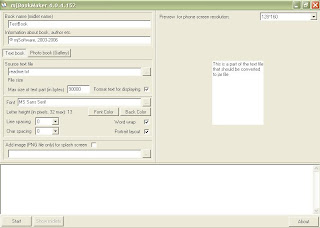
4. If MJ Book Maker is finished downloading, open the application. No need for this application based nginstal Portable. This picture 


• Book name (midlet name): fill with ebook titles. 
• Information about books, authors etc.: Fill in the information about the ebook. For example, publishers, authors, etc.. 
• Source text file: looking for ebook files that you change to text format by clicking the icon "..." 
• Max size of text part (in bytes): Write the numbers are large or above 100 thousand to create ebook apps into one. Write the numbers small or below 100 thousand to create applications Ebook into pieces 
• Font: select the font that you like by clicking the "..." 
• Font color: select a font color for applications Ebook 
• Back color: choose the background color for FREE Ebook 
• Line spacing: line spacing 
• Char spacing: spacing between letters 
• Word wrap: put a tick in the box next to it 
• On the right screen, adjust the screen size of your mobile phone. 
5. Once the above is completed then click on the START button and wait for a moment and then click the Show button to see the results of the application Midlet Ebook 
6. Enter the file format *. Jar into your phone 
How the above is not so perfect, therefore if there is a lack in understanding common question via comments. Congratulations Creating Applications Ebook 

How to Fix a Corrupted Flash Disk

cara memperbaiki flashdiskHow to Fix a grouch - Are the data traveler or often called a USB stick buddy damage? Certainly very unfortunate not, especially if flash is your favorite flash, and a lot of data and not the data? wah wah wah, high blood pressure can be made. Generally, damage flashsdisk divided into two (2) types of damage is damage to mechanical failure or physical failure and damage to the software. The damage of the hardware such as flash broken, loose solder, broken pcb track etc.. While damage from the flash software is the damage which can not function even physically in good shape. Damage is the latter that can be completed by using the software to repair the damage they will flash.


As you might experience when striking the stick into your PC or laptop port, apparently flash does not work and the message that might make you upset. Some common types of messages that appear; Properties "flash read 0 bytes". The message "Please insert a disk into drive X:" The message "device media is write-protected" The message "There is no media in the specified device" Notice: For the following software only works if the problem on the flash is like 4 points above, for cases where flash is not detected, the tool does not work. How to Fix a flash with the Software, and this tool can help you;


Repair Flashdisk - download here


PS: Based on our sadur article said that most of the above software Software has been on trial by the owner and it worked, but try to complete their own testing yes. Hopefully this information how to fix the flash above is useful =) Fetched search: how to fix flash write protected, how to fix the flash that can not be formatted to fix a dead flash total, how to fix an unreadable flash, flash how to fix affected by the virus, how to fix the flash rawcara fix flash 0 bytes, how to fix the flash that kept the format requested

How to Fix Blue Screen Windows 7


"Blue Screen Of Death (BSOD)" is due to critical errorsin the Windows Operating System that causes all running applications had to be stopped. On this occasion I will share the experience of a few tips how to fix computer that has the bluescreen
Sometimes for us beginners, or those new to the world of computers was very upset and a little scared sih.Nah here I will share the experience of facing the problem on windows where suddenly turn into blue screen which is called by the people who are involved in the world of IT ( bluescreen).
First of all if my friend all face problems as I mentioned earlier the first attitude is someone we do not panic, especially if the friend all see a screen that says dumping memory, do not panic (heheheh meaning slow) do not splashy trus says faulty RAM memory Windows 7 product or ugly.
Actually the steps are simple, first restart your computer and wait for the computer to reboot. Well koq blue screen again, oops do not immediately get angry, well, try turning off your computer, Press the Power button on the computer, and hold it until the computer was really off. Then restart the computer, press F8 while booting and wait and then you will log on windows boot option, well here select boot with safe mode, wait until the windows boot with safe mode. Well now you are logged into the operating system safe mode.Langkah s tart then click Windows select Control Panel >> System & Security >> ​​Center >> recovery >> action open System restore >> next >> next >> finish >> yes. Wait and let windows auto restart, after that windows will boot again, well now windowsnya was able to boot normally again and no blue screen again or dumping memory.
Well if the above way can not solve the problem in another way, namely cobara.
Repair Windows Operating System
Bluescreen sometimes occurs because there are some Windows files are corrupted, to solve the easiest way is to do a Repair on the Windows operating system, using your Windows DVD Operating Sytem.
And if the above way also can not solve the problem of the blue before, now try the other way, namely,
Checking the Hardware Device.
The first check your hard disk it is, sometimes the bad condition of the hard disk, or poorly, can lead to Blue Screen, if the hard disk is okay, and you do not find significant damage a good idea to check your RAM memory, make sure that Your RAM is installed properly, or if it is needed check your RAM by running the program "Windows Memory Diagnostic"

Good luck, well,,, may be useful.

How Overcoming Bluescreen On Laptops

Overcoming Bluescreen On LaptopsOvercoming Bluescreen On Laptops - Bluescreen, Have you while doing jobs report, browsing the internet, or playing favorite games, suddenly your laptop restarts by itself, and then when it was rebooted unexpectedly just bluescreen you get with some information listed. But still, you can not use a laptop. 

Bluescreen also called Bluescreen of Death (BSOD) is a term that is widely known for the screen displayed when the Windows operating system experience a system error (or so-called stop error by windows). Some of the things that led to the emergence of this BSOD, including a hardware driver that is not good, the RAM memory writing error, system crash on the registry windows or use dll files that do not match. 

On a PC, unlike a laptop or notebook, you can easily analyze the recent changes to your PC, especially in hardware. Unfortunately, the users who use a laptop it is very difficult to do, while still under warranty the store, not everyone can easily understand the hardware-hardware in the laptop. But do not be discouraged beforehand ... Overcoming some Bluescreen On Laptops are ... 

First, make sure the first safe mode menu is not experiencing crashes (this is if the latest driver for hardware that is not helped to load the windows). To be on the safe mode , when the initial boot continuously hit F5, then select safe mode in the options that appear, at the beginning of the display, you will be asked whether to enable System Restore menu, select No to enable system restore. Perform a restore on your windows, how: Start> All Programs> Accessories> System Tools> System Restore. Choose the closest restore point. If you do not want to use system restore on windows, 

In addition to the above, the best way is by clicking disable your hardware drivers are the latest. How: press Windows + Pause Break simultaneously to display your windows system properties, select hardware tab, select the device manager to display the device manager. Disable hardware drivers you install before the Bluescreen. Or do a driver rollback to revert to the previous driver. 

In some cases bluescreen or BSOD, we absolutely can not use a laptop. To overcome it requires a Software like Acronis True Image (can be downloaded for free on the internet ) or a kind of back-up software. To make sure that before you have back up your system first. Make bootable CD media on your PC or laptop your friend, then do the boot with the CD. Then do you restore the backup system. 

In addition to driver error, Bluescreen can also be caused by a virus / trojan disguised as file services on the system, such as smss.exe, winlogon.exe, services.exe Isass.exe and. To fix this try to keep track of virus / trojan is a portable antivirus program, run an antivirus program, but this time instead of a removable storage such as hard disks or flash. Perform a virus scan through unremovable storage such as CD or DVD. This is why you need antivirus portable so you do not need to perform the installation process prior to your system that may have been infected by a virus / trojan first. 

Good luck Overcoming Bluescreen On Laptops ...!!

Sumber : http://iptek-4u.blogspot.com/2012/06/cara-mengatasi-bluescreen-pada-laptop.html#ixzz2Ckwh8STm

Introducing WINDOWS 8


Microsoft introduced Windows 8 Preview to public

Microsoft   began introducing its latest operating system Windows 7 successor.  

CALIFORNIA _ Chairman of Microsoft, Bill Gates, in an interview expressed his admiration for Windows 8, which is an important product for the future of the software giant. The founder of Microsoft was assessing the entire ecosystem of Windows 8 was amazing. 
According to him, the ecosystem of Windows 8, users finally get a good mix of an operating system with touch capabilities. 


"People will be amazed at the energy of the placed behind Microsoft's new products. This is great momentum for us," said Gates, as quoted from Softpedia, Tuesday (10/23/2012). 
"This is a huge milestone for all of the products in terms of connecting cloud services. Windows 8, Windows Phone 8, and the latest version of Office comes, all will have a safe, personalized, and beautiful things," he continued. 
Microsoft is calling the next generation of Windows, with the internal code-named "Windows 8,". Windows 8 is a "reimagining of Windows from the chip to the interface". A Windows 8-based PC is really a new type of computing device with a touch screen feature that comes with the ability to adjust the scale on the small screen in the form of tiles (tile base screen). 


Although the new user interface is designed and optimized for touch screen (touch screen), which can be accessed with or without a keyboard and mouse .. The user interface and new apps will work on a variety of screen sizes and pixel densities, from a small board for laptop, desktop, all-in-one, and even classroom-sized displays. This new approach provides more options to the users to use whatever kind of device you want, with the diiginkan peripherals, to run applications on your computer. It is certainly inspire a new generation of hardware and software development, as well as improving the experience for PC users around the world.


Windows 8 that has appeared almost universally, until his ads have been interesting to look at. Operating System Windows 8? for now I myself have used the Operating System
Here I will share about the delivery of ads that often appear on TV, been a few days, the ad appears, not bored-tuh Advertising bosennya clay, so the ads are ads on Promotion of Windows 8, this ad makes me want to sing too, with lyrics the appropriate theme of the ad itself. every ad that appears I was wondering who sings the song in the ad windows 8 it? soundtrack in the ad turns Windows 8 & Lenka: Everything at Once.


Windows 8 release in late October that yesterday (26/10) has been the talk for a week later. Latest operating system offers exciting features to the user experience that is different from before. Recently, Windows 8 is indirectly also popularized another song titled Lenka Everything At Once. This song is a song that was released in 2011 and became Lenka themesong of advertising Windows 8 in 2012.
Lenka is a singer born in Australia 34 years ago. Although 34 years old, and disposition Lenka face still looks cute and young. He was popular thanks to his song called The Show in 2008. The Show is often used as a track for a variety of advertising and become one of the OST titled Hollywood movie Moneyball with Brad Pitt as the main star.


source :microsoft